Building trust in Truecaller
10 min read
Redesigning the onboarding and permission flow to help users make informed choices about access

Background
01
What users want from Truecaller?
Identify unknown callers
Make and receive calls
Be notified of spam calls, fraud calls and SMS
Identify genuine services from fake
Problem
01
Concerns regarding trust

Since Truecaller has access to permissions like phone logs and SMS, users believe Truecaller can read bank SMS and OTPs.
Because of these accusations the trust in the app is slowly getting eroded.
Problems with current onboarding
1
When a user installs Truecaller for the first time they are asked for 5 different permissions, which overwhelms the user.


2
The UX writing on the app and permissions makes the user feel that their privacy is being invaded. For example "Know who is calling before your answer", sounds like the app monitors user calls and messages.
Goal
04
Secondary research
02
Approach
1
Ask after the value is clear:
Users find it easier to give permissions when they are informed about their choices.
2
Ask on first use of the feature:
The permissions need to be triggered when the user tries to use a feature for the first time.
2
UX copy:
The UX writing should be simple with less jargons and focus on value rather the feature.
?
What am I giving up?
Vs
What am I getting?
Concepts
In the initial concept stage, the focus was on providing the right amount of information to users without overwhelming them.
1
Idea 1:
To test the same flow as original with multiple permissions being asked all at once.
2
Idea 2:
Educate users on permission purpose, and outline the impact of denying it. Show only the most important permission during onboarding.


3
Idea 3:
On denial of a permission, display a follow up screen with the features that they will miss out.


Primary research
03
Comparative usability testing
Participants
5 overall
2 (Truecaller user)
3 (non-Truecaller user)
Objective
How might we gain trust in the product through the onboarding flow?
What we tested?
Did users feel overwhelmed?
Where they clear about permissions?
Was there privacy concerns?
Example questions
How did you feel about the way permissions were asked?
What version felt the clearest in explaining why permissions are needed?
Which version made you feel the most in control?
Insights from usability testing
Insight 1
Users felt helpless and forced into accepting permissions in the first version. They wanted to understand the consequences of denying it before accepting them.
F4, F5, F6, F8
Insight 2
Users felt the most control and least pressure in version 2 as it provided them explanation to benefits and what they would miss if they declined, all in one view.
F10, F11, F7
Insight 3
Users where confused or misinterpreted on how the permission requests where phrased, which created concerns about privacy in the product.
F6, F3
Insight 4
Users felt overwhelmed with the number of permissions in the first version. They tend to read only headlines and skim through the paragraph.
F8,F2
Refinement
01
New challenges
Problem
From usability testing version 2 had the most positive reviews but android system permissions cannot be edited by any third party company.
Revised approach
Educate users at start even before you show any permissions.
Make users try the features, so they can learn and understand better by performing a task.
Improve UX writing to focus on value and transparency.
High-fi concepts
Educating users with interaction.
Users go through a swipe up interaction to reveal the caller ID.
Why swipe up? because that's the interactive motion to receive a call when using Truecaller.
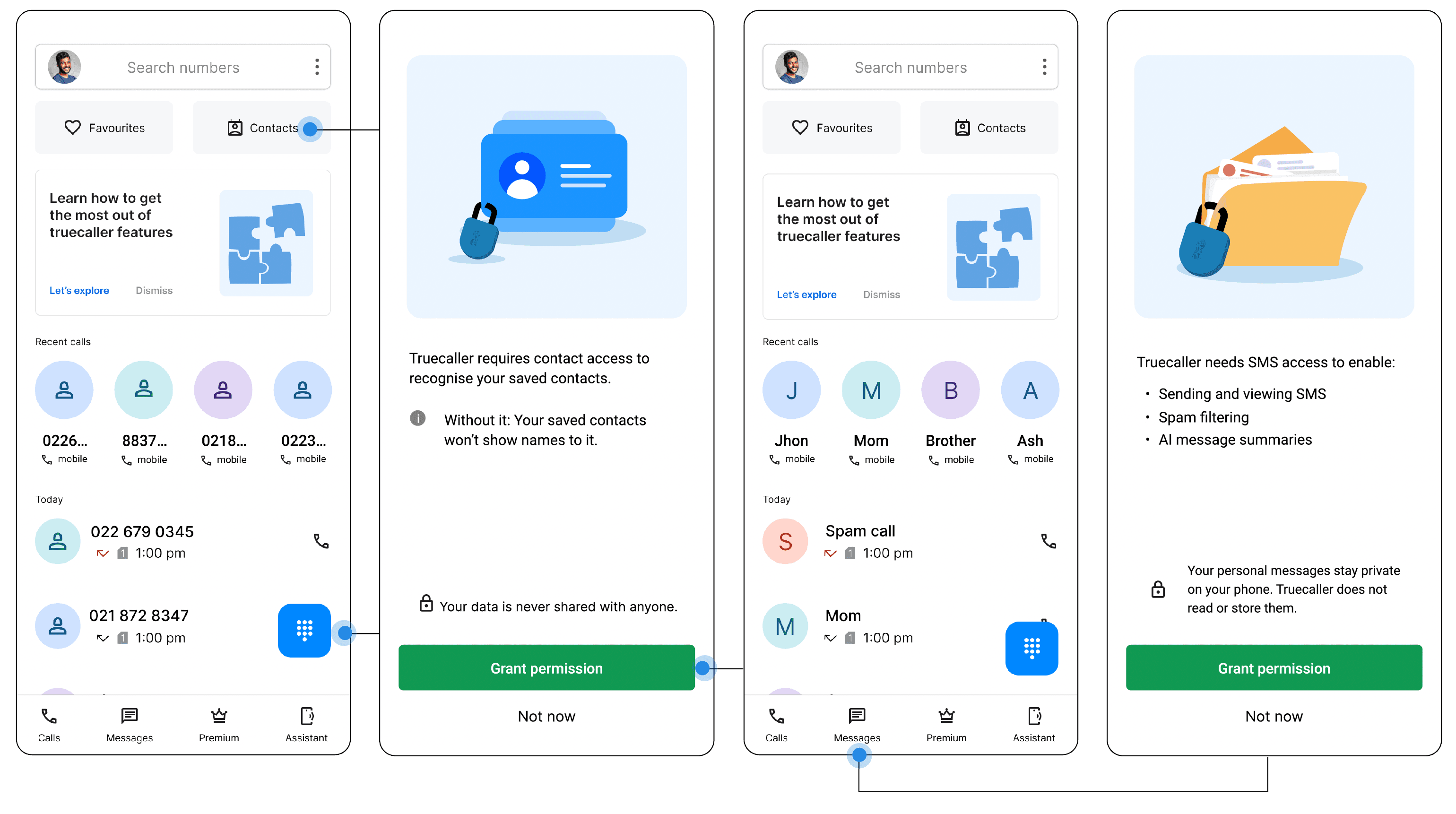
Progressive permissions
Contextual permissions are asked when a user tries to access certain features like Smart SMS, Truecaller assistant.
Take aways
02
Future iterations
A/B test between
Providing education screens upfront
Providing a separate feature onboarding flow when they are inside the app.
Understand if users feel confident about this flow and does it reinforce transparency.
Test the caller ID flow to see if users get the idea or understand via interaction.
Learnings
Users don’t generally deny permissions its just mainly because of a lack of information.
Users learn things by doing, so show value in those interactions.
When features like smart SMS are not explained well to users, they believe Truecaller has access to their phone and private messages
Simple, straightforward UX copy focusing on the value of the product rather than the features.

Next Project
Deckhand
Electronic logbook for fishermen